Showing posts with label electives. Show all posts

Monday, July 22, 2013

Review: Homeschool Programming Inc.


Mackenzie has been bugging me for.ev.er. to let her build a webpage. What do I know about building a webpage? Not much. I can edit the HTML on my blog a teeny bit but that's the extent of my knowledge.  I looked at some of the different programs out there but everything that I found was for PCs only. A bit of a let down for this MAC only family.

Imagine our surprise when we learned that  Homeschool Programming Inc. had created a web-based design curriculum? Imagine our glee when were we chosen to review their Kidcoder: Beginning Web Design.
 photo logo_zpsfc09b7b4.jpg

About Homeschool Programming Inc


Homeschool Programming Inc. was created by an incredibly smart homeschooling couple. Like all homeschooling parents, they were out perusing for some curriculum for their children. A computer programing curriculum to be specific. Guess what they found? Nothing.

So being super smart about such things, they created one. One that a non-techie parent like me can understand and teach. And so the KidCoder and TeenCoder curriculum was born.

Our Experience

 photo KC_BWD_Cover_MED_zps2e139921.jpg

We reviewed the KidCoder: Beginning Web Design course. This one semester course was designed to teach students to create their on web site from scratch. We're talking hand coding HTML. Sounds daunting right? Not with this easy to use course.

The course covers:
     *Mark up concepts
     *Website layouts and files
     *Backing up projects
     *Essential HTML symbols
     *Styling of text
     *Using symbols and lists
     *Internal and external hyperlinks
     *Navigation bars and footers
     *Simple CSS effects
     *Spacing and positioning
     *Graphics and image editing
     *Tables

We received the product in e-book form and the download was seamless. I was also able to load it onto our iPad without a problem. My original plan was to have her read it from the iPad. Early on I changed my mind and printed it out chapter by chapter. She needed to to a lot of flipping back and forth to work through some of the assignments and it was easier to do this with printed pages. It's a lot of printing. I'd love to see a physical book.

For the purpose of this review we read through the lessons together and then she worked on the assignments. This isn't necessary though. She could easily read, understand, and work through it on her own but I wanted some knowledge for review purposes. I planned for us to work on one chapter a week. If you get stuck on something, help is only an email away. The customer service is quick and top notch. They'll work with you until your problem is solved.

To say that Mackenzie is excited about this course is the understatement of the year. She loves it and is always chomping at the bit to do "just one more lesson." One chapter a week was torture. lol She went to camp for a week and a half during the review period and she was on the computer "hand coding" not too long after her return. Isn't she super cool?

And it simply thrills her when she completes an assignment and her coding does exactly what the book says it will do, even if it's just a blank web page with a simple sentence on it. She was hooked from the first assignment. It's very rewarding to see your very own web page coming together bit by bit. And it's been a helpful for me and my blog too. I'm learning how to tweak things that are bothering me.

This course is a definite keeper. Mackenzie is looking forward to finishing it and moving on to the Advanced Web Design course. It's an easy and fun way for your student to learn a valuable skill and maybe a middle school or high school credit while they're at it. Love, love, love it!!!

F.Y.I.


Website: http://www.homeschoolprogramming.com/

Facebook:  https://www.facebook.com/HomeschoolProgramming

Age Range: 4th-12th grade

Pricing:

$70 for Beginning Web Design
$85 for Beginning Web Design w/DVDs
$20 for DVDs only
The Advanced Course will be out in August and priced the same as the beginner course
$145 for the Web Year Pack (Beginning and Advanced) with DVD,

Photobucket


Friday, September 7, 2012

Review: Speekee TV


The phrase "it's a small world" has never been more true then it is now. Just hop on a plane and you can be across the globe in just a day. Our family, before Kayleigh, has been blessed to spend three years in Guam and travel a bit. Even without traveling, you're very likely to bump into someone who speaks a foreign language. Learning another language is something that can only benefit everyone.

I was very excited to learn that I was being given the opportunity to review Speekee TV with my little one. I have seen it around on various blogs and had always thought it looked interesting. And my hubby was just saying that we needed to start teaching Kayleigh another language while she was still young. God's perfect timing!

About Speekee TV

Photobucket

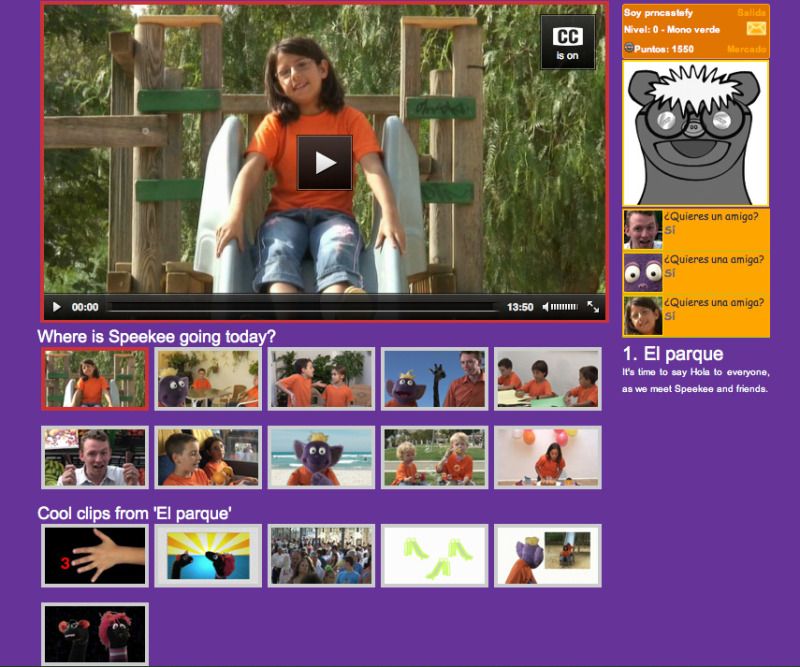
Speekee TV is an online Spanish immersion program geared for children ages 2-10.  It is designed so that children can learn Spanishin their own time and at their own pace. Includes:

** 10 episodes of Spanish

** Over 150 minutes of pure Spanish learning

** Learn Spanish from real Spanish children
in real Spanish locations

** Features songs, animation, and puppets

** Optional subtitles

** Free activity sheet downloads

** Free optional curriculum

** Created by specialist language teachers.


Our Experience


We were given a six month subscription to Speekee TV.

The first time we watched an episode, Kayleigh was very overwhelmed with the amount of information presented. It was a lot. Especially considering that it is a full immersion approach. I quickly learned to break the episodes into more manageable pieces. This is very easy to do since they already have them divided by scenes.  You can watch the whole thing or just click on a specific scene. Nice and easy!


Another nice feature of Speekee TV is that they have done all of the lesson planning for you. A nice feature for a busy homeschool mom. All I had to do was sign up for the Fast Track Lessons and they deliver them to my inbox every week. How is awesome is that? You can also access the lesson plans on line. The plans include watching the video, practicing vocabulary, making puppets, and playing games. Lots of fun!


As soon as I broke down the lessons into smaller bits, Kayleigh was all smiles. She loves the characters in the episodes and asks to watch it all the time. And she really started picking up the vocabulary. You never know when she's going to pop out with one of her Spanish phrases. She thinks it's the coolest thing ever.

They also offer other resources such as flash cards and worksheets. Kayleigh wasn't old enough to make use of these yet but they are great supplements for the older children.

All in all, we loved this program and are continuing to use it past the review period.

F.Y.I.


Website: http://www.speekee.co.uk/index.php

Age Range: 2-10

Pricing: $7.50/month or $60/year
Try it free for two weeks!


Photobucket


Disclaimer: I received a free subscription to this program for review purposes. All opinions are my own or those of my family. 

Saturday, July 14, 2012

Review: Keyboarding for the Christian School


Living in the computer age, it's imperative for my children to learn how to type properly. The odds are that they'll be spending the rest their lives typing on a keyboard. It's a much needed skill for every child.

Enter one of our latest review items, Keyboarding for the Christian School.

About Keyboarding for the Christian School


From the website:

Do you anticipate your students using computers in the future? Is your student going into a technological field? How far your student will go will be determined by their proficiency in computers. Give them the edge in computer applications by purchasing curriculum that really works...Keyboarding for the Christian School.

These tools will pay for themselves many times over as your student utilizes this valuable skill for success at school and work while instilling Christian values.

Why choose a printable e-book versus a web-based program? Think about the things you type. Are they readily available to copy from the screen or are they something that you are looking at on a piece of paper? Usually you are typing something from a rough draft. If the lessons are only available on the computer monitor; your student will not get the need skill of transferring information from paper to computer.

Our Experience


This is a simple, no-frills typing program. Basically the students reads each lesson and then types it onto the computer. It's really that easy. And it's very thorough.

The first 29 lessons deal with learning all of the keys. There is even a few lessons teaching the number pad. Other lessons cover, centering, enumerated lists, the tab key, MLA reports, APA reports, cover pages, works cited, bibliography, personal-business letters, business letters, envelopes, proofreader's marks, timed writings, and tables. I don't think that they missed a skill.

There are many ways to use the e-book.  You can print and bind the entire book, just print the pages that you need, or even load onto your e-reader. We choose the latter and loaded it onto our iPad. It was quick, painless,  and easy for my daughter to read the lessons right off it. A simple way to save $$$ and a tree or two.

I know that they are a lot of fancy typing programs out there these days but when I was first reading through the e-book I got a bit of a deja vu feeling. The simple instructions, "Type the a in sets of three 10 times as shown below:

aaa aaa aaa aaa aaa aaa aaa aaa aaa aaa "  reminded me of my own high school typing class. I could hear my teacher saying that letters in my head "aaa space aaa space..." It was simple, uncomplicated and it worked. I am an excellent typist.

That's how I feel about Keyboarding for the Christian School. It's simple, uncomplicated, and it works. Mackenzie liked it too. She could do it on her own and complete the assignments in a matter of minutes. And she's remembering the skills learned and applying them to her free computer time. I call that a win.

F.Y.I.


Website:  https://www.christiankeyboarding.com/
Samples: https://www.christiankeyboarding.com/Page_2.php
Age Range: 6th grade & up - There's also an elementary version
Price: $15.95

And if that price isn't enough of a bargain, they are offering 20% off through August 29, 2012. Just use the code: SUMMER2012


Photobucket


Disclaimer: I received a copy of this product for review purposes. All opinions are my own or that of my children.

LinkWithin

Related Posts Plugin for WordPress, Blogger...